-
 25 October 2026
-
 Reading time: 11 minutes
-
 Victor Domingos
-
 News
News
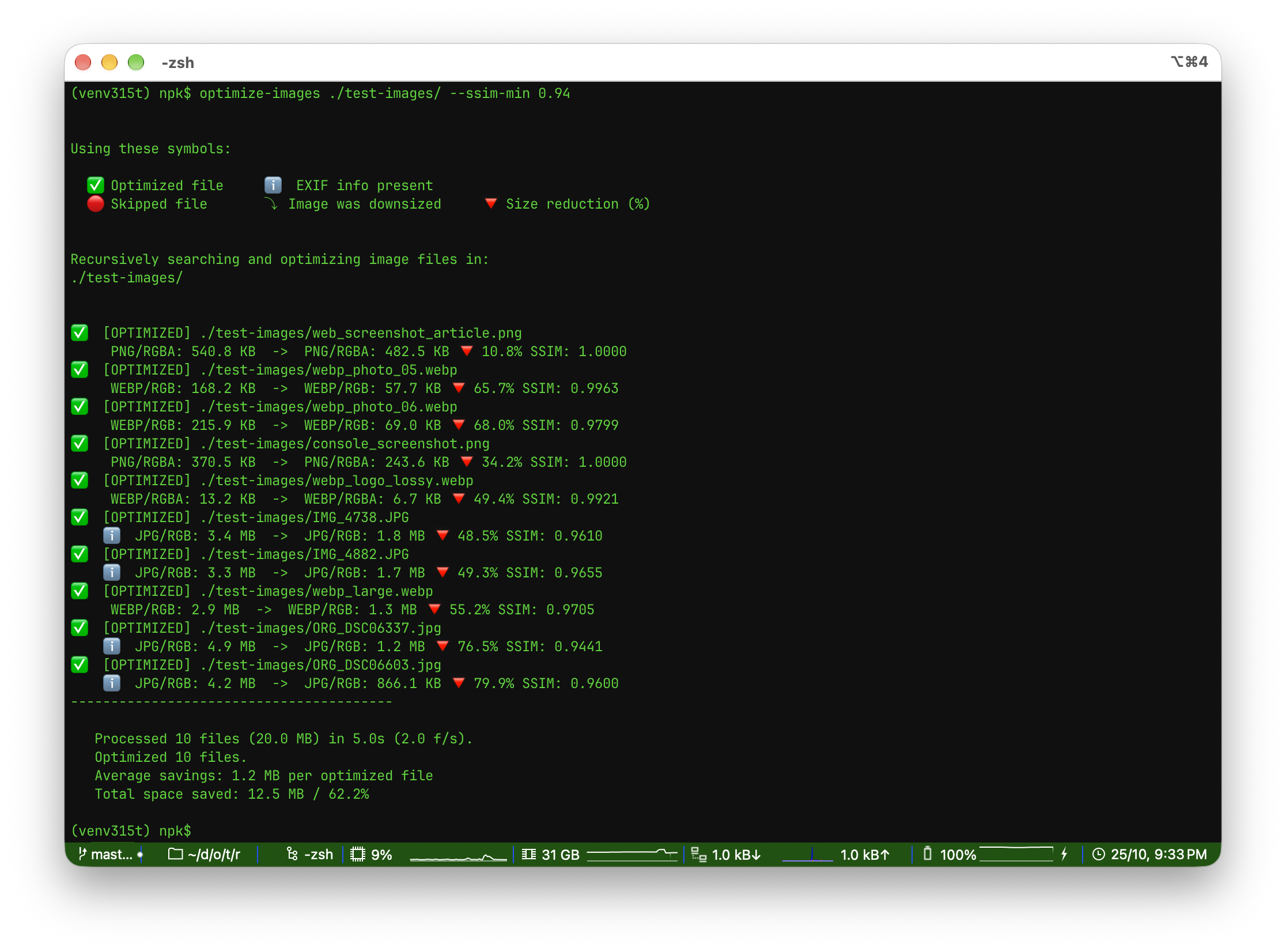
Optimize Images 2.2.0 has just been released, and it makes JPEG files even smaller by default, adds an optional SSIM-based quality check, and now keeps embedded colour profiles such as the Display P3 profile of iPhone photos. It also requires Pillow 13.0.0 for important security fixes, and makes batches and watch mode more reliable.
This release is mostly about making your images even smaller, while paying closer attention to their quality. JPEG files now shrink more by default, and a new optional check makes sure that no optimized image drops below the quality level you choose. You don’t need to change your scripts or settings to benefit from this, since the defaults were chosen to work well for most photos.
JPEG files are now smaller thanks to the new -jt/--jpeg-tables option, which uses the quantization tables of the mozjpeg encoder. On the project’s test images, this made JPEG files about 12% smaller, with the same visual quality. As usual, the optimized file is only kept when it turns out smaller than the original.
There is also a new --ssim-min option, which keeps the original file whenever the optimized result falls below a chosen quality threshold, measured with SSIM (structural similarity). It relies on scikit-image, an optional dependency that you can install with the new [ssim] extra.
Embedded ICC colour profiles are now kept, too. This is easy to see with iPhone photos, which use the wide-gamut Display P3 profile: before, the profile was removed and their colours could look duller than the original. Now they look just the same, although the files may be slightly larger. Efficiency was a constant concern throughout this release (modules are loaded only when needed, and the JPEG quality search does less work), so the new features don’t make the tool slower. And Python 3.15 is now supported.
This release also includes some important fixes. The minimum Pillow version is now 13.0.0, which fixes five security vulnerabilities. Ctrl-C now stops a batch safely, watch mode is more reliable, and running out of memory no longer aborts the whole batch. Please note that Python 3.11 is now the minimum version.
Here is the complete changelog for this version:
Optimize Images v.2.2.0 - 2026-10-25
- Security: minimum Pillow is now 13.0.0, which fixes five vulnerabilities in Pillow 12.3.0 and older. The critical one, CVE-2026-112403, could be reached by optimize-images: a crafted lossless JPEG downscaled with -mw/-mh (also when converting, or through max_w/max_h in the API) could overflow a heap buffer. CVE-2026-112404 and CVE-2026-112897 (crafted TIFF files) could only be reached through -ca with a TIFF file given an image extension, or through convert_image_data(); CVE-2026-112397 and CVE-2026-112896 affect Pillow features optimize-images does not use. Users who cannot upgrade optimize-images yet are also protected by upgrading Pillow alone (pip install -U Pillow); optimize-images 2.1.0 was tested with Pillow 13.0.0. Python 3.13t users now need to build Pillow from source, since Pillow 13 has no wheels for that Python.
- Behaviour change (JPEG): smaller JPEG files by default. New -jt/—jpeg-tables option (JPEG, conversion to JPEG): ‘auto’ (the default), ‘standard’ or ‘mozjpeg3’. ‘mozjpeg3’ encodes with the default quantization table of the mozjpeg encoder (index 3), for brightness and colour, scaled from the same quality value; only the table changes, not the encoder, and the output is still a baseline JPEG. ‘auto’ uses ‘standard’ for JPEG files already saved with the standard tables at about the quality used (such as files optimized before by optimize-images), so they are not compressed a second time, and ‘mozjpeg3’ for everything else; with —ssim-min, a file whose mozjpeg3 result scores below the threshold is encoded again with the standard tables before the original is kept. On the project’s test images, ‘auto’ gives JPEG files about 12% smaller in total (median SSIMULACRA 2 loss of 0.2 points) and PNG to JPEG conversions about 3% smaller, with the same quality. ‘standard’ restores the previous output exactly. CMYK JPEGs are not affected. Public API (backwards compatible): keyword-only jpeg_tables argument in optimize_single_image(), optimize_image_data() and convert_image_data(), and a matching PublicBatchOptions field (default ‘auto’); unknown names raise ValueError.
- New SSIM quality control: the -ssm/—ssim-min THRESHOLD option (JPEG, WebP, conversion; value between 0.0 and 1.0) computes the structural similarity between the image as it was just before the final lossy encoding (after all transforms) and the optimized or converted result, and keeps the original file whenever the score falls below the threshold. The check is independent of the size comparison, so it also applies when the comparison is disabled with -nc.
- New —show-ssim / —no-show-ssim options (JPEG, WebP, conversion) control the SSIM score in the per-file report. The score is shown automatically whenever —ssim-min is used; with —no-show-ssim it is hidden for optimized files, but a file rejected because its score fell below the threshold is still reported with the score and the threshold.
- SSIM computation relies on the optional scikit-image package (install it with: pip install scikit-image, or use the new [ssim] extra: pip install optimize-images[ssim]). Without it, —ssim-min stops the run early with a clear error message, and —show-ssim prints a warning once and shows no scores.
- Files rejected by the SSIM threshold are reported with their score and the threshold, so they stay distinguishable from files skipped because they were not smaller.
- Measured across 224 photographs with the default encoder, scores range 0.929-1.0 (median 0.981): 0.92 keeps everything a default run produces, while 0.95 rejects about 2% of the files (roughly 2.5% of the space savings). Computing the score can dominate the run time on very large images, and it is inert for PNG files that are not converted (their in-place encoding is lossless, score always 1.0000).
- For images with transparency, the score is computed over the background color (-bg/-hbg, white by default), so invisible RGB under transparent pixels no longer lowers it.
- The score uses scikit-image’s structural_similarity with its default uniform 7x7 window (the parameters are pinned explicitly, so the scores do not change if scikit-image changes its defaults). Scores are slightly higher (about +0.004) than tools using the Gaussian window of the original paper; the recommended thresholds were calibrated with this implementation.
- Faster start: numpy and scikit-image are loaded only when SSIM scores are computed, and the process-pool and package-metadata modules only when they are used. On the test machine (macOS, Python 3.11-3.15), optimize-images —version takes about 60-90 ms instead of 140-270 ms, a single image is optimized 38-47% faster, and importing the library is 2.5-4.5 times faster.
- Faster JPEG optimization: the automatic quality search downsizes its 400x400 working copy in two steps (Pillow’s reducing_gap), about 11% faster with -jobs 1 on Python 3.12 and later. The chosen quality can be one step lower on a few photos (1 to 3 of 80 test photos: 2-4% smaller, SSIM lower by 0.002 at most).
- Embedded ICC colour profiles are now kept when optimizing and converting JPEG, WebP and PNG files (profiles equivalent to sRGB are removed). Files with a wide-gamut profile may be slightly larger, but their colours no longer change.
- Dropped Python 3.10 (end of life since 2026-10-01); Python 3.11 is now the minimum. Python 3.15 is supported. The [ssim] extra now also declares numpy.
- Public API (backwards compatible): optimize_single_image(), optimize_image_data() and convert_image_data() gained keyword-only ssim_min and show_ssim arguments; PublicBatchOptions gained the matching ssim_min and show_ssim fields; PublicTaskResult reports the computed score in a new ssim field (None when SSIM was not computed; with ssim_min alone, files rejected by the size check are not scored; show_ssim always returns the score). The public entry points raise ValueError for an ssim_min outside 0.0-1.0.
- SSIM: identical (lossless) outputs are scored 1.0 without running the comparison, and batches that compute SSIM scores run at most 8 images at a time by default (much faster on macOS and Windows, where the default used up to 64 and 32 threads respectively).
- convert_image_data() and the other conversion entry points probe the available target formats once per process instead of on every call (3-5% faster when converting small images in memory).
- Removed the unused optimize_images/watch.py module. Directory watching has been served by the public API (optimize_images.api.watch_directory) since v1.4; the -wd/—watch-directory option is unaffected.
- Behaviour change (JPEG): -q / quality is now honoured without fast mode. Previously, -q was ignored for in-place JPEG optimization unless -fm was also given. Now, when a quality is explicitly provided, it is always used (with or without fast mode). Without -q, quality is chosen automatically, except with -fm and in conversions to JPEG/AVIF, which use 80. Public API quality now defaults to None (previously 80), so ‘not given’ is distinguishable from quality=80.
- Ctrl-C now stops a batch promptly and safely: files not started yet are left untouched, files in progress are finished first, and no traceback is shown. Before, the whole batch kept running to the end on macOS and Windows, and with worker processes (the default on Linux) an interrupted worker could leave an image truncated to 0 bytes in place of the original. Public API: stopping optimize_as_batch_stream() early (break, an exception or Ctrl-C) now also cancels the files not started yet.
- Watch mode (-wd) is more reliable. Files renamed into place (a temporary file renamed when complete, as browsers and many editors save) are now processed; before, they were ignored. A new file that reuses the name of an earlier one is processed again; before, each name was processed only once per session. The copy written by -ca/-cb and already processed files that are only renamed are no longer optimized a second time. A file is processed only after it has not changed for half a second, instead of 10 ms, so files copied slowly are no longer read half-written and skipped. To tell a finished file from one still being written, watch mode measures the file system’s clock when it starts, by creating and removing a small temporary file in the folder. An error while handling one file no longer ends the watch silently: it is shown and watching goes on. Public API: the same applies to watch_directory(), where an exception raised by on_result is printed to standard error with its traceback, and a watcher that stops unexpectedly raises the new OIWatchStoppedError instead of waiting forever.
- Running out of memory (for instance with a high -jobs value on big images), or an image above Pillow’s pixel limit, no longer aborts the whole batch with an error: the file is skipped, its original is kept, the report says why, and the final summary suggests a lower -jobs value when memory ran out (also while computing SSIM scores). Results expose the reason in a new error field.
- -rc no longer turns the transparent areas of PNG images opaque (or, with partial transparency, makes them more transparent): fully transparent pixels stay transparent, using one palette entry that counts toward -mc, and half-transparent pixels keep an approximate transparency. -rc is also much faster on palette images.
- Palette PNG optimization now keeps every colour (it used to re-quantize the image) and is much faster. The palette and its transparency are stored compactly (only the colours used). Palette PNGs may therefore shrink less than before, because their colours are no longer changed.
- The CLI no longer crashes when a file name cannot be written in the output encoding (e.g. Windows output redirected to a file or pipe); such characters are shown as “?”. Unicode icons and the path ellipsis fall back to ASCII when the output cannot display them.
- Animated PNG files (APNG) are now left untouched, like animated WebP files, instead of being flattened to their first frame. (Camera MPO files are still optimized as their primary image, as before.)
- Converting a 16-bit grayscale PNG (Pillow modes I;16, I;16B, I;16L and I) to another format now scales the samples to 8 bits (each value divided by 256) instead of clipping every value above 255 to white.
- Converting a CMYK image (typically a JPEG) to a format that does not support CMYK, such as PNG or WebP, now converts it to RGB first instead of failing with an error.
- setup.py reads README.md as UTF-8, so building the package no longer depends on the system’s text encoding.
Get it now!
Just pip install -U optimize-images, following the instructions in the docs (Optimize Images). For the new SSIM quality control, use pip install -U "optimize-images[ssim]".
You may also be interested:
|
Just updated - Optimize Images v2.1.0 |
|
Just updated - both Optimize Images and Optimize Images X |

|
Just updated - both Optimize Images and Optimize Images X |
Recently
|
Just updated - Optimize Images v2.2.0 |
|
npk-bar: a Claude Code mod for context, limits and progress |
|
Optimize Images X adds internationalization |